The Logic of Automation: Deconstructing the Boeing 737 MCP and its Digital Twin
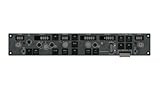
The Mode Control Panel (MCP) is the nerve center of the Boeing 737. It is the interface through which the pilot communicates their intent to the Flight Management Computer (FMC) and the Autopilot Flight Director System (AFDS). It is a complex strip of logic, governing everything from the aircraft’s speed to its vertical path.
Recreating this panel for a home simulator is an engineering challenge that goes beyond mere plastic molding. It requires understanding the underlying logic of Boeing’s automation philosophy and translating that into a USB device that talks to sophisticated software simulations. The SYDYSOSO CS 737X MCP claims to be a “digital twin” of the real unit. This article dissects the layout of the MCP, explains the function of its critical controls, and analyzes the system architecture that allows this hardware to interface seamlessly with complex aircraft add-ons.

Anatomy of the MCP: A Functional Tour
The layout of the 737 MCP is standard across the Next Generation (NG) fleet (specifically the Collins / Honeywell style). It follows the logical flow of flight information: Speed, Navigation, and Altitude.
1. The Speed Window (Autothrottle)
Located on the left, this section controls the aircraft’s energy.
* N1 / SPEED Buttons: Selects the mode. N1 maintains a fixed thrust rating (used for climb), while SPEED maintains a specific airspeed (used for cruise/descent).
* C/O (Change Over) Button: A small, critical button that switches the display between Indicated Airspeed (Knots) and Mach number. In the CS 737X, this isn’t just a dummy button; pushing it instantly changes the digital readout, syncing with the transition altitude logic of the simulator.
* The A/T Arm Switch: As discussed previously, this is the master switch for the autothrottle servos. Its electromagnetic holding capability in the CS 737X is crucial for realism, simulating the system’s ability to “trip off” during faults.
2. The Heading/Course Windows (Lateral Navigation)
The center-left section manages where the plane is pointing.
* HDG SEL (Heading Select): The most tactile control. Pilots turn the heading knob to command a turn. The CS 737X features the Bank Angle Limit Selector—a concentric ring around the heading knob. This physical ring restricts the autopilot’s bank angle (e.g., to 10, 15, 20, 25, or 30 degrees). This is vital for passenger comfort and safety during engine-out scenarios. Many cheaper replicas omit this concentric ring, but its inclusion here marks the device as “study-level.”
* LNAV (Lateral Navigation): Tells the plane to follow the GPS route programmed in the computer.
3. The Altitude/Vertical Speed Windows (Vertical Navigation)
The right side manages height.
* Altitude Selector: A large knob used to set the target altitude.
* V/S (Vertical Speed) Wheel: A unique control—a thumbwheel rather than a knob. Rolling it up or down commands a specific rate of climb or descent (e.g., +1500 ft/min). The tactile “click” of this wheel is essential for precise inputs without overshooting. The CS 737X replicates this form factor accurately.
* VNAV (Vertical Navigation): The most complex mode, where the computer manages the climb and descent profiles to optimize fuel.
System Integration: The Bridge to the Virtual World
Hardware is useless without software. A physical switch is just a piece of plastic until it tells the simulator what to do. The challenge with advanced addons like PMDG 737 (Microsoft Flight Simulator) or ZIBO 737 (X-Plane) is that they use custom internal logic (“L-Vars” or Data Refs) that standard joystick drivers cannot see.
The Driver Bridge
SYDYSOSO (via its manufacturer CockpitMaster) utilizes a specialized Bridge Software.
1. Extraction: The software reads the internal state of the aircraft simulation. Is the autopilot light on? Is the speed set to 250?
2. Display: It sends this data to the MCP hardware, lighting up the LEDs and populating the 7-segment displays. This creates a bi-directional loop. If you change the speed in the virtual cockpit with your mouse, the physical numbers on your desk update instantly.
3. Injection: When you flip a switch on the hardware, the software injects that command directly into the simulation engine.
This seamless integration, described as “Plug and Play,” effectively hides the complexity of the interface from the user. There is no need to manually map 50 different buttons in the simulator settings; the bridge handles the logic translation.
Power and Data Architecture
Replicating a real MCP requires power. Those 7-segment displays, backlights, and especially the electromagnetic A/T switch consume more energy than a standard USB port provides.
Typically, such hardware requires a separate AC power adapter (wall wart). However, the CS 737X employs a clever engineering solution: a Built-in Power Boost Converter.
* DC-DC Conversion: It takes the standard 5V supplied by the USB C port and steps it up internally to the 12V or higher required for the solenoids and lighting. This eliminates the need for an external power brick, reducing cable clutter—a major win for home cockpit builders.
The Daisy Chain
For users building a full cockpit, USB port scarcity is a real problem. The CS 737X supports Daisy Chaining.
You can connect an EFIS panel (Electronic Flight Instrument System) or a CDU (Control Display Unit) directly to the MCP via expansion ports on the back. The MCP acts as a hub, channeling data from all these devices through a single USB cable to the PC. This modular architecture allows a user to start with just the MCP and gradually expand to a full glare shield setup without needing a massive USB hub.
Conclusion: The Logic of Fidelity
The SYDYSOSO CS 737X MCP is a triumph of system integration. It successfully encapsulates the complex logic of the Boeing 737 flight guidance system into a hardware unit that is physically authentic and electronically sophisticated. By solving the power delivery and software communication challenges internally, it allows the user to focus on the logic of flying rather than the logic of configuring.
For the serious simmer, understanding this architecture reveals why the device commands its price. It is not just buttons and lights; it is a dedicated avionics computer that sits on your desk, speaking the language of the Boeing 737 fluently.